Understanding Custom 3D Configurator Software
In the realm of product customization and manufacturing, a custom 3D configurator is changing the game. These powerful tools allow businesses across various industries to create interactive product visualizations that facilitate better customer engagement and streamline the sales process. Customers can visualize their choices in real-time, enhancing the buying experience and allowing businesses to cater precisely to their clients' needs. This article delves into the intricacies of custom 3D configurators, how they function, and their significant impact across different sectors, ultimately providing actionable insights for your business.
What is a Custom 3D Configurator?
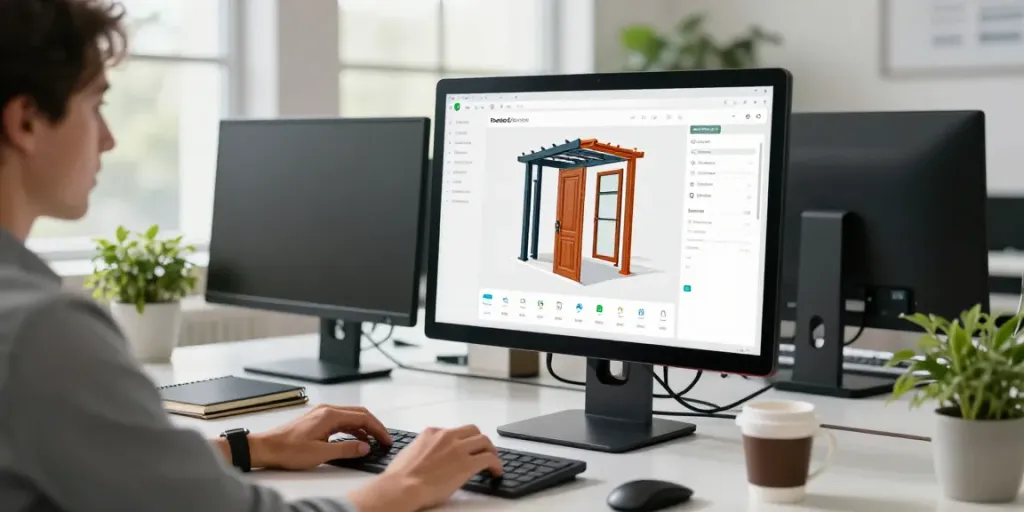
A custom 3D configurator is an interactive software tool that allows users to personalize and visualize products in three-dimensional space. These configurators are particularly beneficial for industries offering complex, customizable products where a variety of options and features can significantly alter the final outcome. They enable customers to select components, materials, colors, and sizes through a user-friendly interface, all while instantly displaying the effects of those choices in real-time 3D renderings.
At their core, 3D configurators are designed to enhance the user experience by providing immediate feedback, showcasing various products, and helping potential customers make informed decisions. They act as the bridge between the customer's vision and the manufacturer's capabilities, transforming abstract ideas into tangible products.
Key Features and Benefits
- Real-Time Visualization: One of the most significant benefits of a custom 3D configurator is the ability to visualize products as they are being configured. Customers can see how changes affect the design immediately, which boosts confidence in their choices.
- Guided Selling: Configurators can guide users through complex product choices, ensuring that they select compatible options and understand the implications of their choices.
- Data Integration: These tools can be integrated with other systems such as CRM, ERP, and eCommerce platforms, creating a seamless workflow from configuration to production and sales.
- Cost Efficiency: By enabling customers to configure products online, businesses can reduce the time and resources spent on sales consultations, thus leading to increased efficiency and profit margins.
Industries That Benefit from Custom 3D Configurators
Custom 3D configurators are particularly advantageous for various industries, including but not limited to:
- Manufacturing: Companies producing machinery, automotive parts, and industrial equipment can use configurators to enable clients to specify complex parameters and configurations.
- Construction: Businesses in the construction industry, such as those manufacturing doors, windows, or outdoor structures like pergolas and garden rooms, benefit significantly from configurators to showcase customization options.
- Furniture: Retailers dealing with customized furniture can use configurators to allow customers to choose the size, fabric, and features of their products.
- Fashion: Apparel brands can implement configurators to allow users to design and visualize their clothing with different styles, colors, and fabrics.
Building an Effective Product Journey
Mapping Out Your Product's Configuration Process
To implement a successful custom 3D configurator, businesses must first map out their product's configuration journey. This involves defining each step of the process from initial selection to final output, ensuring a coherent and user-friendly experience. A well-defined journey will not only help customers navigate the customization process but will also ensure that the configurator is capable of handling the complexity of the products being offered.
Guided Choices and User Experience
Creating an intuitive user interface is essential for any custom 3D configurator. Users should be able to easily understand their choices and see how each decision influences the configuration. Consider incorporating guided choices that help customers understand the implications of their selections, such as compatibility or aesthetic choices. Excellent user experience design can significantly reduce drop-off rates and foster customer satisfaction.
Integrating with Existing Systems for Seamless Workflow
It’s crucial for a custom 3D configurator to integrate smoothly with existing business systems such as CRM, ERP, and eCommerce. This connectivity allows for efficient data transfer and enables automated workflows, reducing manual tasks and potential errors in the sales process. Integration provides businesses with a comprehensive view of customer interactions, from initial inquiries to final purchases, improving overall efficiency and data accuracy.
Implementation Strategies for Custom 3D Configurators
Step-by-Step Implementation Process
Implementing a custom 3D configurator involves several strategic steps:
- Define Your Objectives: Clarify what you aim to achieve with the configurator, be it increased sales, improved customer engagement, or reduced configuration errors.
- Select the Right Technology: Choose a technology platform that supports your configuration goals. Look for flexibility, integration capabilities, and scalability.
- Develop the Configurator: Work collaboratively with software developers and designers to create a configuration tool that meets your criteria. This includes defining product rules, pricing strategies, and user interfaces.
- Test and Validate: Before going live, conduct thorough testing to ensure that the configurator functions as intended. Collect feedback from beta users and address any issues that may arise.
- Launch and Monitor: After launch, continuously monitor user interactions and gather performance data to refine and improve the configurator over time.
Common Challenges and Solutions
Every implementation comes with its challenges. Some common issues include:
- Technical Complexities: Navigating technical challenges in integration or real-time rendering can be daunting. Partnering with experienced developers who understand your industry can ease this process.
- Customer Adoption: Customers may be hesitant to use a new configuration tool. Running training sessions and providing ample support can help ease this transition.
- Maintaining Accurate Data: Ensuring that data within the configurator is up-to-date and accurate is vital for customer satisfaction. Regular audits and updates can help maintain data integrity.
Best Practices for Successful Deployment
To ensure a successful deployment of your custom 3D configurator, consider the following best practices:
- Continuous User Feedback: Regularly solicit feedback from users to identify areas for enhancement and improvement.
- Iterative Improvements: Use an agile approach to continuously refine and enhance the configurator based on user interactions and market changes.
- Comprehensive Training: Offer robust training for both staff and customers to ensure everyone is comfortable using the configurator effectively.
Real-World Applications of Custom 3D Configurators
Case Studies in Diverse Industries
Understanding how businesses successfully implement 3D configurators can provide valuable insights. For instance, a prominent manufacturer of custom windows and doors integrated a 3D configurator into their website, allowing customers to visualize their selections interactively. This not only reduced the time spent in the sales process but also led to a 30% increase in customer satisfaction as buyers were able to see exactly what they were getting.
Impact on Sales and Customer Engagement
Custom 3D configurators dramatically impact sales and customer engagement. By allowing customers to customize products to their preferences, businesses can create a sense of ownership and investment in the product. This leads to higher conversion rates, as customers are more likely to make a purchase once they’ve visualized their ideal product. Moreover, integrating analytics into the configurator helps businesses understand customer preferences, which can inform marketing strategies and product development.
Future Trends in 3D Product Configuration
As technology advances, the future of custom 3D configurators looks promising. Emerging trends include:
- Augmented Reality (AR): AR integration allows customers to visualize products in their own environment, adding an immersive layer to the purchasing experience.
- Artificial Intelligence (AI): AI can enhance the configurator by analyzing customer behavior and making personalized suggestions, improving user engagement.
- Mobile Optimization: As more customers shop via mobile devices, ensuring that 3D configurators are mobile-friendly will be crucial for reaching a broader audience.
Measuring Success and Performance
Key Performance Indicators for Configurator Success
To assess the effectiveness of your custom 3D configurator, it’s essential to track specific Key Performance Indicators (KPIs). Important metrics to consider include:
- User Engagement: Monitor how often users interact with the configurator and the duration of their sessions.
- Conversion Rates: Measure the percentage of users who configure a product and proceed to purchase.
- Customer Feedback Scores: Collect feedback directly from users to gauge satisfaction and usability.
Feedback Loops and Continuous Improvement
Implementing feedback loops is vital for continuous improvement. Create channels for customers to provide insights, report issues, and suggest enhancements. Regularly review this feedback to make data-driven decisions for updates and refinements.
What to Expect in 2026 and Beyond
The landscape of custom 3D product configurators will likely evolve significantly in the coming years. Businesses should prepare for increased integration of AI and AR technologies, as well as a stronger emphasis on data security and user personalization. Companies that embrace these innovations will be better positioned to meet the ever-changing demands of their customers and the competitive market landscape.
What is a 3D configurator?
A 3D configurator is a tool that enables users to customize and visualize products in three-dimensional space, enhancing the online shopping experience.
How can I create my own 3D model?
Creating a 3D model typically requires software such as Blender or SketchUp, along with foundational skills in 3D design. Alternatively, you can collaborate with professional designers for high-quality models.
What industries use custom 3D configurators?
Industries ranging from manufacturing and construction to fashion and furniture utilize custom 3D configurators to enhance product personalization and customer engagement.
Does the software integrate with other systems?
Yes, most custom 3D configurators can integrate seamlessly with existing systems like CRM, ERP, and eCommerce platforms, facilitating smooth workflows across the business.
What challenges can arise during implementation?
Common implementation challenges include technical complexities, customer adoption hurdles, and data accuracy issues. Adequate training and robust testing can mitigate these challenges.